Every time a web application hosted on one domain tries to fetch resources from a different domain, the browser steps in to enforce security boundaries. This mechanism is known as Cross-Origin Resource Sharing, or CORS. While modern web applications frequently pull data across different services, APIs, and CDNs, browsers protect users by default through the Same-Origin Policy. Understanding how CORS operates helps developers build robust APIs and troubleshoot common network errors effectively.
When a request crosses domain boundaries, the browser does not simply send the payload and hope for the best. Instead, it evaluates the request type, headers, and destination to determine if the interaction is authorized. For complex operations, the browser initiates a preliminary handshake known as a preflight request. For a broader look at how web projects come together, you can review some of our development overview and notes before diving deeper into the technical mechanics.
What Is the Same-Origin Policy and Why CORS Exists
The Same-Origin Policy is a fundamental security concept implemented in web browsers. It restricts how a document or script loaded from one origin can interact with a resource from another origin. Two URLs share the same origin if they have the same protocol, port, and host. Without this barrier, a malicious website could load scripts that silently read sensitive data from banking portals or internal dashboards where a user happens to be authenticated.
CORS was introduced as a standardized way to relax this rigid restriction safely. Rather than blocking all cross-origin communication, CORS allows servers to explicitly declare which external origins are permitted to read their responses. Through specific HTTP response headers, a server can grant controlled access to trusted frontend applications while keeping unauthorized actors locked out.
Simple Requests Versus Complex Requests
Not every cross-origin request triggers a preflight check. Browsers divide cross-origin HTTP requests into two categories: simple requests and requests that require preflighting. A request is classified as simple only when it meets strict criteria. It must use a standard method such as GET, HEAD, or POST, and it cannot include custom headers beyond a specific set of safe headers like Accept, Accept-Language, and Content-Type within limited mime types.
When an application sends a request that falls outside these simple parameters—such as a PUT or DELETE request, or a POST request carrying application/json with custom authentication headers—the browser treats it as a complex request. For these interactions, the browser executes an automatic preflight sequence before sending the actual user payload.
How the OPTIONS Preflight Request Works
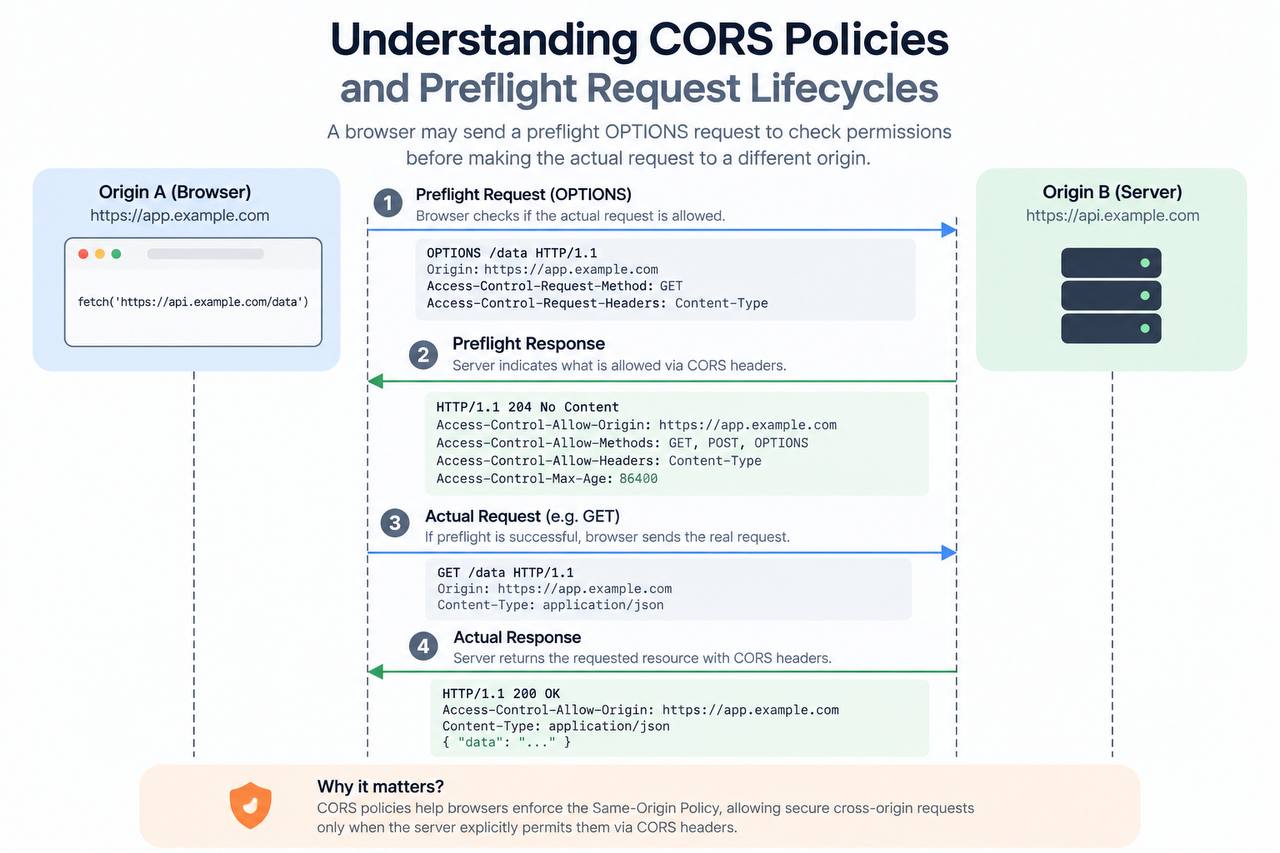
Before dispatching a complex cross-origin request, the browser automatically sends an HTTP request using the OPTIONS method. This preflight message asks the target server if it is willing to accept the actual upcoming request. The browser includes metadata in the preflight headers, informing the server about the intended HTTP method and any custom headers that will be sent.
- Origin Header: Indicates the exact scheme, host, and port of the requesting web application.
- Access-Control-Request-Method: Tells the server which HTTP method will be used in the actual request.
- Access-Control-Request-Headers: Lists any custom headers the client plans to include during the transmission.
Server Response Headers and Permissions
Upon receiving the OPTIONS preflight request, the server inspects the incoming headers and decides whether to allow the operation. If permitted, the server replies with an HTTP status code indicating success, accompanied by specific response headers that define the boundaries of the permission.
Key response headers include Access-Control-Allow-Origin, which specifies which origin is allowed to access the resource, and Access-Control-Allow-Methods, which lists the permitted HTTP verbs. The server can also provide an Access-Control-Max-Age header, telling the browser how long it can cache the preflight response so it does not need to send an OPTIONS check for every subsequent API call.
CORS headers do not secure your backend server against direct requests; they protect browser users by enforcing intentional origin boundaries.
Common Pitfalls and Debugging Strategies
Developers frequently encounter CORS errors during local development, particularly when a frontend application running on localhost talks to an API on a different port. Another common issue occurs when an API endpoint returns an error status code, but lacks the required CORS headers on the error response, causing the browser to mask the actual server error behind a generic network failure.
When debugging CORS issues, checking the browser developer tools network tab is essential. Inspecting both the OPTIONS preflight request and the final response headers reveals exactly which header is missing or misconfigured. Configuring a reverse proxy during local development or ensuring backend middleware correctly populates CORS headers for all response paths usually resolves these friction points.
Frequently Asked Questions
Why does my fetch request work in Postman but fail in the browser with a CORS error?
Postman is an API testing client, not a web browser, so it does not enforce the Same-Origin Policy or evaluate CORS headers. Browsers enforce CORS to protect users from malicious scripts running on arbitrary web pages.
Can I bypass CORS by disabling security features in my browser?
While some browsers allow flags or extensions to disable web security for local testing, this approach is insecure for everyday browsing and should never be relied upon as a production solution.
Do simple GET requests trigger an OPTIONS preflight check?
No. Standard GET requests that use safe headers and standard content types do not trigger a preflight check, though the server must still return the correct Access-Control-Allow-Origin header for the browser to expose the response data to the script.